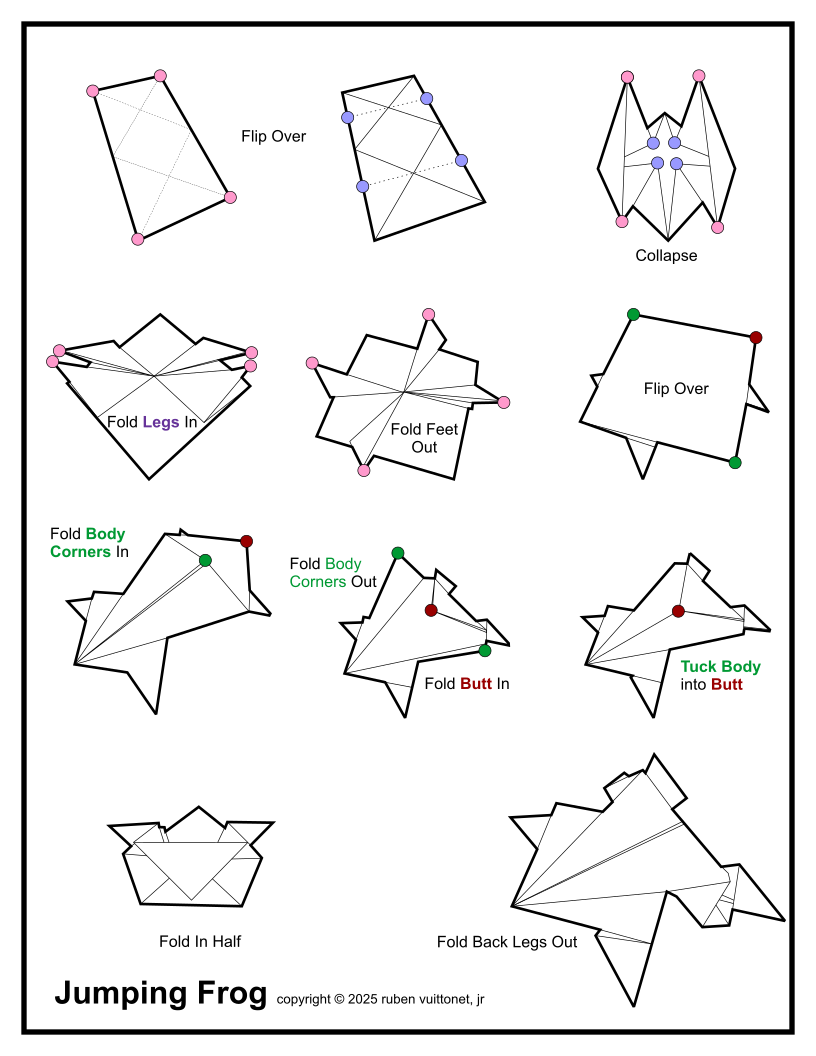
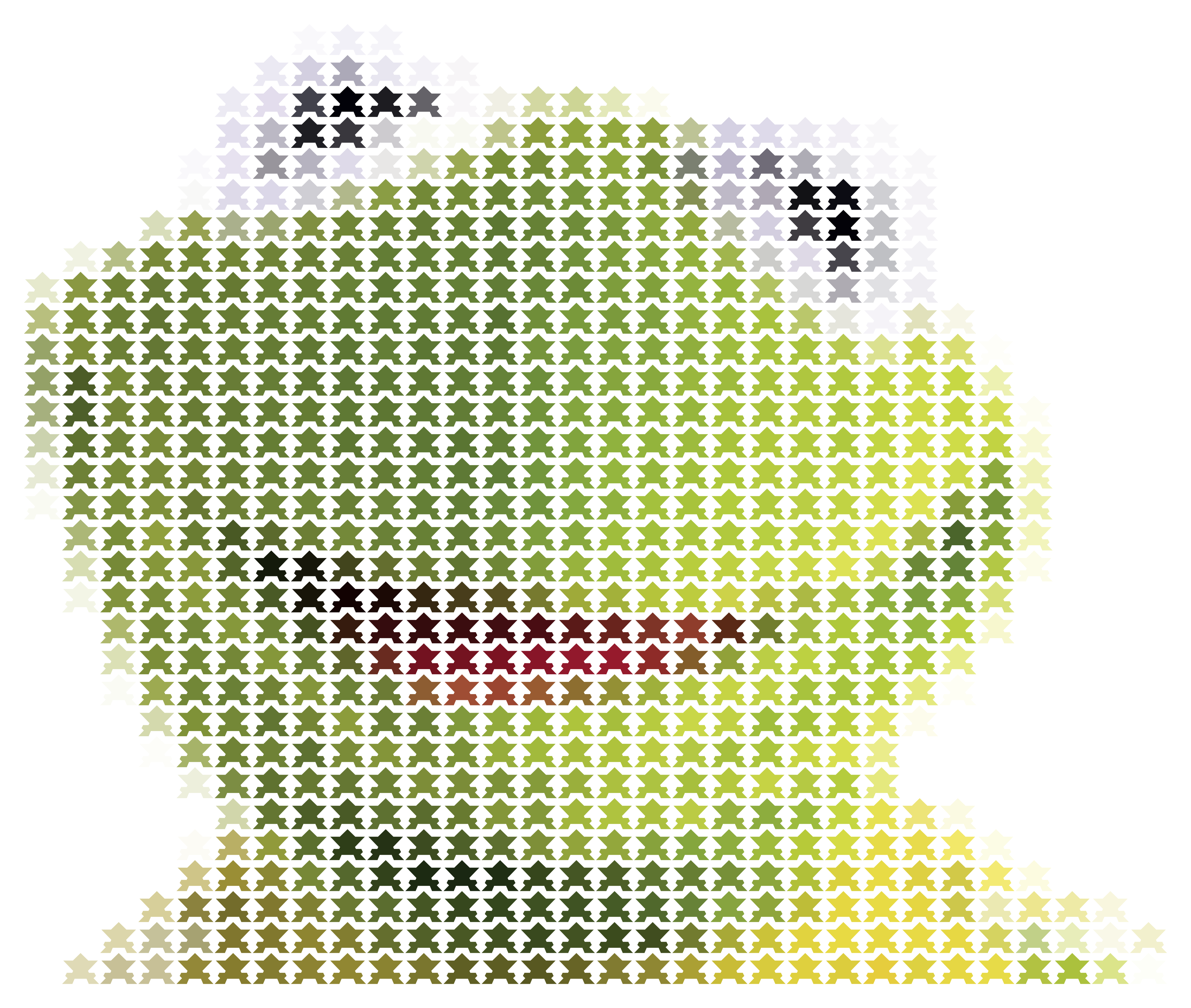
This blog is about a 2 dimensional work of art depicting Kermit the Frog using
origami frogs as picture elements (pixels).
Progress
Below we have a graphic built from the ImagigamI editor. It depicts the progress
for one of the building categories (Folding, in this case) for creating an ImagigamI image.
Next, I folded a frog of the appropriate size, traced the outline
and mapped the points into a custom software application (I wrote) called ImagigamI.
The definition of the form will be used, much later, to create a template for
mounting the frogs into a surface (probably plywood).
What is the ‘appropriate’ size for the frog?
Well, that depends on the size
of the mounting surface to be used for displaying the ImagigamI. I have found
a number of possible materials. As the width/height increases after 48”, the
price goes up exponentially.
The size I have defaulted to is 48” wide × "the needed size for the height."
For example, the Kermint design is 30 columns × 31 rows. For this discussion we
will say that each origami frog is 1.25” × 1.5”.
Given these dimensions, the mounting surface must be a miniumum of
Since the folded frog for is approximate 0.25in wider than it is tall, for
this design I reserved enough space at the top and bottom of the frogs to
make each frog location “square.”
The Final Adjusted Template Size
For the completed template design, including a little white space around the
final dimensions are 48” × 56”. The media from which the mounting surface
will be made is 48” × 96”, which is perfect.
Note: the frog is wider than it is tall, so the board will be rotated to
landscape in order to fit the design.
Sheet tags are various kinds of markings or information that can be added to
a generated sheet of origami paper. In the example, below, there are three
sheet tags:
Dot 1: provides an alignment indicator for when the body of a
frog is folded (creates the triangular shape of the final frog).
Dot 2: provides an alignment indicator for when the tail of the frog
is created.
Cell and Index: provides the (x, y) location for the frog as well
as its index in the rectangular grid that makes up the image’s
pixels. The (x, y) location is useful when attaching the frogs to
the mounting template, a vinyl sheet with outlines of the frog locations
in light gray. Each outline on the template includes an (x, y) location.
For an example of what a section of the template looks like, see the
Mounting
Test section, below.
Below, we have a screen shot of a generated set of origami sheets. Notice how
the sheet marks were used to generate the two dots, (x, y) and index information.
Once sheets of this type are printed, an X-Acto knife is used to cut them into
individual origami sheets for folding.
Below, we have an image of a frog’s bottom to illustrate the information printed
on each generated origami sheet. The first two numbers are the cell number for
the form. That is, the first number is the column (x) and the second number
is the row (y). The third number is the index or the form. The index is useful
in case the sheet needs to be reprinted.
Once the forms are attached to the template, these numbers will no longer be
visible.
The end result of the project will be a 2 dimensional image of Kermit the Frog
composed of origami frogs. The custom software produces a projection of the
final project…
A single frog with a quarter for scale. They may seem small, but when the
entire project put together, the image with 687 origami frogs will be
approximately 58” × 48”.
Here we have a piece of fiberboard stapled to a piece of plywood. This was a
test to determine if my staple gun would penetrate the fiberboard well enough
to afix it to stabilizing struts on the back of the work.
I was unable to pry the fiberboard from he plywood with my fingers, so I feel
this will prove an adequate method for attaching the fiberboard to struts.
For a previous project using paper cranes, I mounted the template onto plywood.
This turned out to be a massive headache as the plywood was heavy, unsmooth,
awkward to handle, and a general nuisance.
So, I’m going with fiberboard, this time. It is quite strong. I bought an 8’ × 4’
sheet of fiberboard, today, and experimented with mounting cranes to an 11” × 11”
piece.
I forwent staples for aesthetic reasons. This test will have these mounted frogs
exposed to the heat and humidity of my garage for a month to determine if the
super glue used to mount the frogs will remain proof against such environmental
elements.
Managing more than 700 cranes can be frustrating without an effective system
for organizing and storing them. I manage my printing labels for each row
of the ImagigamI image and storing each row’s frogs in its own bag.
The “template” has been mentioned throughout this blog. The template is nothing
more than a vinyl sheet with an outline for each frog in the design printed on it.
Inside each outline is the (x, y) coordinate for its frog. Each of the folded
frogs has an (x, y) coordinate printed on it. To mount the frogs, simply find
the correct frog for each outline and glue it there.1
Once the template is printed (by a vendor), it is glued to the mounting surface
with and industrial grade adhesive. With that completed, the mounting surface
is ready to accept the frogs.
Below, we have the full-sized template for the Kermit ImagigamI. It’s a little
light. If you want a better view, right click the image and select Open in new tab.
The template shown is 58” × 48”. To view the template full size, right-click on the image
and select “Open image in new tab” or something similar.
1To organize the folded frogs and make them easier to manage, I store them in ZipLoc® sandwhich bags. Each row is stored in its own bag. When it comes time to mount a row of frogs on the mounting surface, I find the correct bag for the row, remove the frogs from it, and line them up from left to right. ▲